

The Reality of Scaling Audio Production
Recording voiceovers drains energy faster than almost any other editing task. You set up the microphone, wait for the neighborhood to quiet down, and try to read a script without sounding completely robotic. Stumbling over a single sentence usually means starting the entire take over from scratch. My deep frustration with inconsistent audio quality forced me to test synthetic generation utilities thoroughly.
Staring at a timeline filled with bad audio takes kills creative momentum instantly. You spend hours manually slicing out heavy breaths, mouth clicks, and awkward pauses. Hiring freelance voice actors costs hundreds of dollars per project and delays publishing schedules by several days. Most independent creators simply accept poor audio because professional studio time remains completely out of reach. When you want to translate a successful video for a Spanish or German audience, the barrier to entry feels impossible. You either use jarring subtitles or pay for expensive translation services that strip away your personal brand's identity.
Breaking Down the Voice Generation Engine
Text-to-speech technology sounded exactly like a cheap GPS navigation system just a few update cycles ago. The current AI models analyze the grammatical context of the sentence to determine where to place emphasis. This ElevenLabs Voice Cloning/Dubbing Review looks directly at how the software replicates natural speech patterns rather than just pronouncing individual words.
How Professional Voice Cloning Actually Works
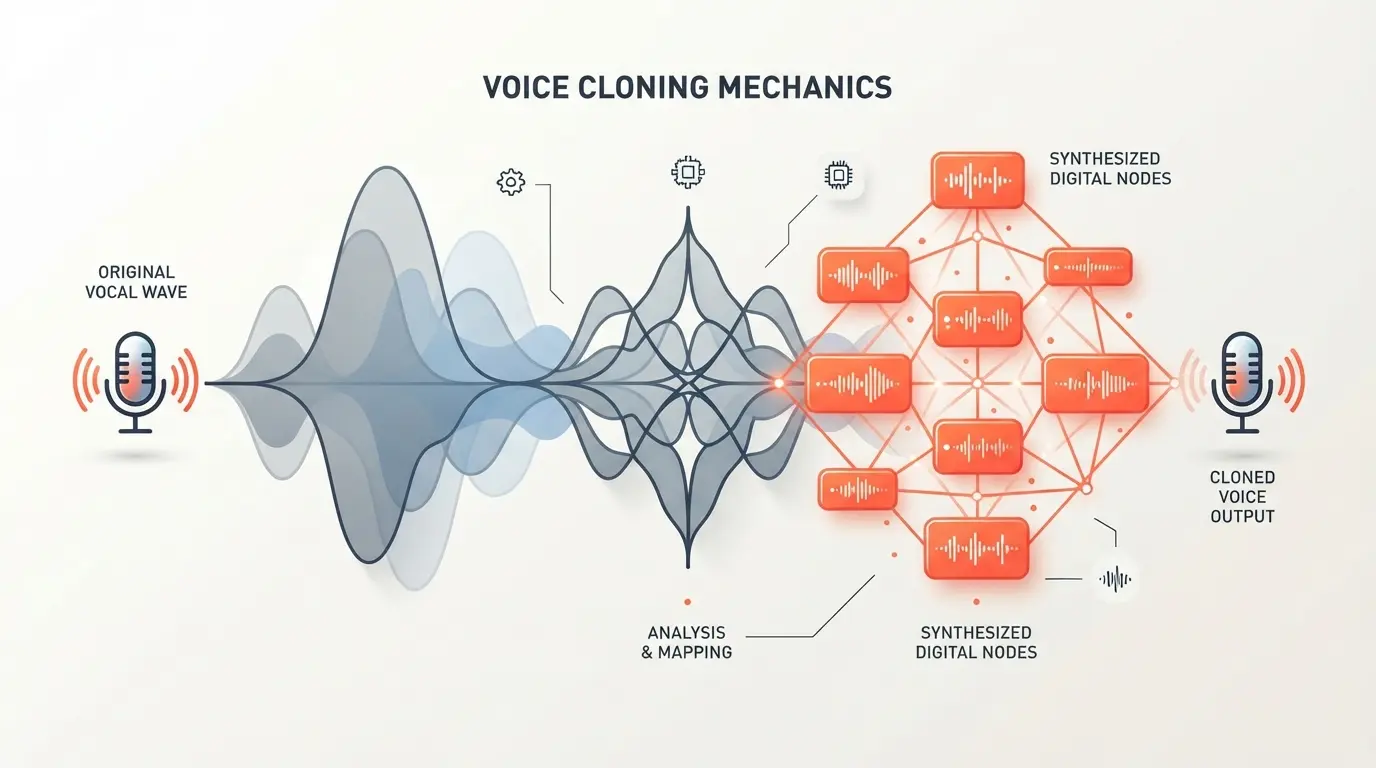
You cannot upload a noisy, thirty-second clip recorded on a smartphone and expect a flawless digital replica. The system requires clean, isolated audio data to build a usable profile. Instant Voice Cloning gives you a fast, basic approximation of your pitch using just one minute of audio. Professional Voice Cloning requires you to provide over thirty minutes of high-fidelity studio recording to capture your specific cadence, breath control, and pronunciation quirks.
I fed clean podcast episodes into the training model. The resulting synthetic voice replicated my exact speaking rhythm perfectly. It accurately copied the slight dip in pitch I use at the end of long sentences. The model generated audio that bypassed the unnatural robotic feeling completely. Testing these synthetic clips on close friends revealed that most people simply cannot identify the audio as AI-generated during standard listening.
Managing Emotional Tags and Pacing
Older generation tools forced editors to write complex code to change emotional delivery. The V3 model handles inflection through simple text brackets natively. You type commands like "[laughs]" or "[whispers]" directly into the script editor. The AI interprets these tags and adjusts the generated audio instantly.
This completely changes the editing workflow for narrative content. You can make a specific paragraph sound slightly more energetic or deeply serious without recording a new take. A script can transition from a calm introduction to an excited product reveal seamlessly. You retain total control over the performance purely through text manipulation.
The Mechanics of Automated Translation
Expanding a channel to international audiences usually requires massive capital investment. The localized features tested in this ElevenLabs Voice Cloning/Dubbing Review completely bypass traditional translation agencies. The technology allows you to tap into global traffic without recording separate videos.
Preserving Identity Across Languages
You upload your finished English video file directly into the dashboard. The software extracts the audio, transcribes the spoken words, translates the text, and generates a new voiceover. The brilliant part is that the new Spanish or French audio uses your exact voice profile, matching your personal timbre and pacing.
The system automatically adjusts the timing of the generated speech to match the visual pacing of the original video. Spanish translations typically require more words than English to convey the exact same meaning. The engine slightly compresses the audio delivery to fit within your existing scene cuts. This automated synchronization saves editors hours of tedious timeline adjustments.
Cost Analysis and Credit Consumption
Paying a monthly subscription for software requires a clear return on investment. The pricing structure relies strictly on character limits rather than generated minutes. This system quickly becomes frustrating if you do not track your usage carefully during long projects.
| Production Method | Average Cost | Re-recording Ease | Multi-Language Support |
|---|---|---|---|
| Traditional Voiceover | $150+ per script | Hard (Requires new session) | Extremely Expensive |
| ElevenLabs (Creator Tier) | $22 monthly | Instant (Text edit) | Built-in (70+ Languages) |
| Basic Free TTS Tools | $0 | Instant | Robotic / Poor Quality |
| Hiring Freelance Dubbers | $200+ per language | Hard | Manual Process |
Every single generation attempt consumes your monthly character allowance. If the AI hallucinates a weird pronunciation and you click generate again, you pay for those characters twice. The Creator plan provides 100,000 characters per month, which feels massive until you start making extensive revisions. You should test difficult pronunciations in small, isolated sentences before generating a massive five-thousand-word script.
Troubleshooting Synthetic Audio Anomalies
Even the most advanced models occasionally output bizarre artifacts. You might generate a perfectly calm sentence, and the AI will suddenly spike the volume on the final word. Sometimes, a subtle digital glitch occurs during a simulated breath intake. You have to learn how to manipulate the text to force a cleaner read.
Forcing Natural Pauses
The engine relies heavily on standard punctuation to determine timing. An em-dash creates a distinct break in thought. An ellipsis generates a trailing, uncertain pause. If the AI rushes through a complex sentence, you simply add commas where a human would naturally take a breath. Exploring the broader AI tools category shows that prompt engineering now applies directly to audio timing as well.
Managing the Stability Sliders
The dashboard includes sliders for stability, clarity, and style exaggeration. Cranking the stability slider to the maximum setting forces a highly consistent, monotonous delivery. It sounds exactly like reading a legal disclaimer. Dropping the stability introduces random variance, which increases the emotional realism but also increases the risk of the voice breaking or shifting pitch weirdly. Finding the perfect balance for your specific cloned profile requires systematic testing.
Integrating Voice Generation into Your Editing Flow
You cannot treat synthetic audio as a completely hands-off process. The machine occasionally makes bizarre pacing decisions or misses the intended context of a complex sentence. Proper integration requires a specific workflow to maintain high-quality standards for your audience.
I highly recommend generating your audio in distinct blocks rather than dumping a twenty-page document into the text box at once. Breaking the script down by visual scenes allows you to adjust the emotional tags precisely. You download these smaller audio files and sequence them manually in your non-linear editor. This hybrid approach gives you the speed of AI generation with the fine-tuned control of traditional timeline editing.
- ✅ Write scripts specifically for the ear, using shorter sentences and conversational phrasing.
- ✅ Spell out numbers and symbols (write "twenty dollars" instead of "$20") to prevent robotic delivery.
- ✅ Use phonetic spelling for complex names if the built-in dictionary fails to recognize them.
- ✅ Add physical punctuation aggressively to force natural breathing pauses.
- ✅ Export your final timeline audio as an uncompressed WAV file before running it through any translation tools.
Myth: Synthetic voice generators steal jobs from professional voice actors.
Reality: These tools mostly service independent creators who never had the budget to hire human actors in the first place. High-end commercial campaigns still rely heavily on nuanced human performances that algorithms cannot replicate completely.
Myth: Any timeline editor with text-to-speech sounds exactly the same.
Reality: Comparing dedicated audio models against built-in timeline generators reveals massive differences. If you compare Descript vs Riverside or other basic text-to-speech tools, you will immediately notice that dedicated voice models offer significantly more emotional depth.
Where the Technology Still Struggles
Transparency matters when evaluating subscription software. The platform provides incredible results, but it does not fix fundamentally bad writing. If your script reads like a dense academic paper, the generated voice will sound incredibly boring, regardless of how realistic the tonal quality is.
The interface lacks robust multi-track sequencing capabilities out of the box. You cannot easily layer sound effects, background music, and multiple voices seamlessly within their standard web dashboard. You must export the raw vocal tracks and handle the final mixdown in dedicated software. The platform remains a highly specialized generation tool rather than a complete digital audio workstation.
When testing the dubbing accuracy for this ElevenLabs Voice Cloning/Dubbing Review, highly technical jargon sometimes broke the translation engine. The AI might literally translate a brand name or an industry idiom, resulting in confusing audio for native speakers. You should always have a native speaker review the translated transcript before finalizing the generated dub.
Building a Sustainable Production Habit
Content creation demands consistency over a long period. Replacing the physical friction of recording with a text-based workflow allows you to maintain aggressive publishing schedules. You can draft scripts late at night and generate the polished voiceovers the next morning without waking up your household.
This capability fundamentally shifts how editors approach video production entirely. You no longer have to lock your visual edits completely before recording the final narration. You can generate scratch tracks instantly, block out your b-roll pacing, and tweak the script right up until the final render. If you want to refine this workflow further, researching the best AI tools for podcast editing will help you synchronize your audio perfectly. The freedom to rewrite and regenerate instantly removes the fear of making permanent mistakes during the planning phase.
Frequently Asked Questions
How accurate is ElevenLabs voice cloning for real client projects?
ElevenLabs achieves near-flawless vocal replication when provided with a clean sixty-second studio recording. The underlying neural engine catches subtle breathing patterns, natural accents, and emotional inflections, making the generated audio virtually indistinguishable from organic speech in audiobooks and explainer videos.
Can I use cloned voices commercially on YouTube and podcasts?
Commercial rights depend strictly on your active subscription plan. Paid tiers grant full commercial licensing for synthesized audio tracks and cloned voices, while the free tier restricts output to non-commercial, personal projects with mandatory platform attribution.
Does ElevenLabs voice dubbing preserve original voice tone across different languages?
Yes, the automated dubbing tool analyzes the original speaker's vocal acoustics and applies them directly to the translated script. Your localized tracks maintain your distinct vocal tone, cadence, and identity across dozens of supported languages without sounding like a generic stranger.
How do ElevenLabs credits work during voice generation?
Credits deduct based on generated characters rather than finished audio minutes. Standard text-to-speech consumes roughly one credit per character, but using higher-tier experimental models or continuous voice cloning can consume your monthly credit allowance at a much faster rate.
Is ElevenLabs better than traditional voice actors for explainer videos?
It provides unmatched turnaround speed and cost savings for high-volume content schedules and rapid script revisions. Professional human voice artists still deliver superior theatrical direction and improvisational nuance, but synthetic cloning comfortably handles the vast majority of standard digital explainers.
What recording setup yields the cleanest voice clone results?
A reliable condenser or dynamic microphone placed in an acoustically quiet room produces the best baseline sample. Background laptop fan noise, room echo, and distorted consonants confuse the algorithm, leading to metallic artifacts in the final synthetic clone.

Comments (0)
No comments yet. Be the first!
Leave a Comment